Buying a Used Mobile Radio Kit: What Should Be Included?
· admin
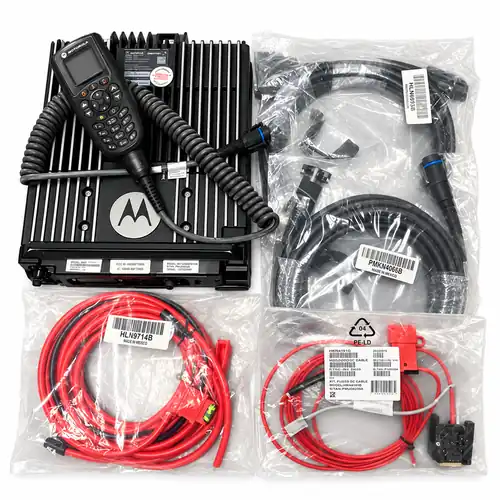
A used mobile radio can be the right model and still arrive without the parts your installation needs. The word “kit” is only a starting point: confirm the radio, control head, cables, mounting hardware and audio equipment item by item before requesting a final quote.
This checklist focuses on mobile-radio packages. For broader questions about condition, programming and buying used equipment, start with our used two-way radio buying guide.
Start with the installation layout
Decide where the radio body and controls will sit before comparing packages. In a dash-mount arrangement, the control head is attached to the radio body. In a remote-mount arrangement, the controls and transceiver can be installed separately, linked by the appropriate cable and hardware.
Motorola Solutions explains this separation in its remote-mount cable guidance. That explains the purpose of these cables; it does not mean every cable fits every Motorola mobile radio. Confirm the exact radio, control head, interfaces and cable part numbers together.
For a remote installation, measure the intended cable route rather than only the straight-line distance. Ask your installer to confirm the required length, mounting locations and access for connections before choosing the kit.
Compare the contents of the specific listing
These RadioMarket listings illustrate why different packages need different checklists. They are examples of listed contents, not a promise that every unit or alternative configuration includes the same accessories. Confirm the current package and availability in your quote.
APX 4500 O2 dash-mount kit
The Motorola APX 4500 VHF O2 dash-mount kit lists the radio in O2 configuration, palm microphone, power cable and accessory cable. The listing describes a built-in speaker in the O2 head. Remote parts and trunnions are available on request; do not count them as included in the default package.
XPR5550e remote-head kit
The Motorola XPR5550e UHF1 remote-head kit lists the remote kit, power cable, microphone, control head and trunnion bracket. Ask for confirmation of the remote cable length and the hardware supplied for both the head and radio body. The handheld remote option mentioned in the listing is an alternative to discuss, not an automatic addition.
APX 7500 O3 kit
The Motorola APX 7500 VHF/700–800 MHz O3 kit lists the O3 head and extension cable, power cable, speaker/ignition cable, accessory converter and speaker. The description says the speaker is not pictured. This is a useful reason to check both the written contents and the photographs, then have any differences clarified in the quote.
Separate control cables from power and accessory cables
A remote-head cable, power cable and accessory cable do different jobs. A listing that includes one does not establish that the others are supplied. Ask for a photograph of the complete cable set, including both ends, labels and any separate adapters.
- Control connection: confirm the cable and interfaces required for the selected head and radio body.
- Power connection: confirm which power leads and associated protection components are supplied and which your installer must provide.
- Accessory connection: identify any speaker, ignition-sense or other accessory leads needed for the intended configuration.
Do not choose wiring or protection ratings from a different model’s listing. Motorola’s APX mobile control-head installation manual treats the radio, controls, antenna, microphone, speaker and cabling as parts of the installation, and calls for space around the radio for connections and mounting access. Have your installer use the applicable instructions for the exact unit and configuration.
Account for mounts, audio and the antenna separately
A radio-body trunnion does not by itself confirm that a separate control-head bracket, screws or microphone holder are included. Ask for an itemized hardware list, especially when changing from dash mount to remote mount.
For audio, confirm where received speech will be heard and which microphone is supplied. The APX 4500 O2 listing’s built-in speaker and the APX 7500 O3 listing’s separate speaker are different package details; neither establishes the requirements of another configuration.
Also ask whether an antenna, antenna mount and coaxial cable are included. If the description does not list them, leave them unconfirmed until the seller answers. Give your installer the exact band configuration and intended installation so the antenna system can be specified appropriately.
Check the radio and head as a working combination
Request clear photographs of the radio label, control-head identification, rear connectors and included accessories. Ask about damaged pins, cut leads, missing fasteners and the condition of the display, buttons and microphone.
Confirm what has been tested with the supplied head and cables. A powered-on photograph is useful, but it does not document every function or prove compatibility with your radio system. Ask your radio technician to check the exact band split, required operating mode, enabled features and programming requirements before purchase. A matching connector or familiar model name is not enough on its own.
Use this checklist when requesting a quote
Include the following details in your inquiry so the package can be confirmed without guessing:
- The listing link, quantity and exact band configuration you need.
- Dash or remote mounting, the intended radio/head locations and estimated cable route length.
- The control head, cable lengths, adapters, microphone and speaker you expect.
- The brackets, trunnions, fasteners and other mounting parts you need supplied.
- Whether an antenna system, installation or programming is needed, and which items you will provide.
- A request for current condition photos, the complete included-parts list and any separately quoted items.
Browse our mobile radios, then contact RadioMarket with the listing and your checklist. You can also use WhatsApp at +1 713 397 9809 or email info@radiomarket.sale. An inquiry lets you confirm the package and request a quote; it does not place an order.
[…] This guide compares two existing RadioMarket listings: the NNTN7619C vehicle charger and the NNTN8527 APX vehicular adapter kit. It focuses on choosing the setup and checking the specific used equipment offered. For a separate mobile transceiver and control-head package, use our used mobile radio kit checklist. […]