APX Vehicle Charger vs Vehicular Adapter: Buyer’s Guide
· admin
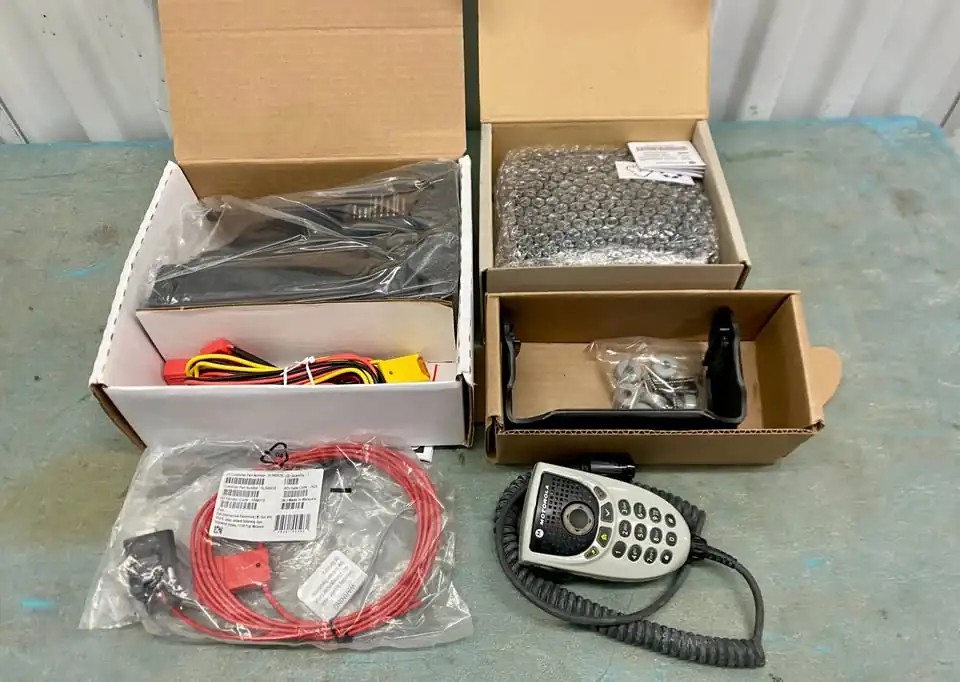
Do you want to keep an APX handheld charged in a vehicle, or use it through a vehicle antenna and separate audio accessories? Answer that question before comparing prices. A vehicle charger and a vehicular adapter can look like similar purchases while solving different problems.
This guide compares two existing RadioMarket listings: the NNTN7619C vehicle charger and the NNTN8527 APX vehicular adapter kit. It focuses on choosing the setup and checking the specific used equipment offered. For a separate mobile transceiver and control-head package, use our used mobile radio kit checklist.
Start with the job you need the equipment to do
For charging: start with a vehicle-charger listing and confirm the exact radio, battery and supplied mounting and power parts. If your main problem is keeping a handheld ready between trips, explain that when requesting a quote.
For a vehicle-integrated portable setup: ask about a vehicular adapter, the antenna connection and the audio equipment required. Motorola describes the NNTN8527 as a setup that charges a compatible portable and uses a vehicle antenna, with microphone and speaker options. See the manufacturer’s NNTN8527 overview.
Write down which functions you need demonstrated. Charging, receiving through the intended antenna and using a separate microphone are individual checks. Evidence that a unit charges a battery does not document every other function you may want.
Read the NNTN7619C condition details before choosing a unit
Our Motorola NNTN7619C vehicle charger listing describes previously installed units supplied with a mounting bracket and power cable. It lists APX 6000, APX 7000 and APX 8000 radios, with the exact radio and battery combination to be confirmed before ordering.
The condition disclosure matters: each unit has a cosmetic defect, and some are missing a VRS toggle or nylon strap. The listing reports that the units otherwise work as chargers. Ask which defect applies to the unit selected for your quote and request photographs of that unit.
Have your installer assess any missing retention or control parts for the intended use. Ask whether replacements are supplied, separately quoted or something you must source. Keep the agreed condition and included parts in writing rather than assuming every charger in the batch is identical.
Check what the NNTN8527 adapter package actually includes
Our Motorola NNTN8527 APX vehicular adapter kit, also described as a Convertacom, lists the adapter, speaker, mounting bracket, accessory cable and DTMF microphone.
Compare that itemized listing with the manufacturer’s requirements and your existing installation. Ask separately about power leads, lock keys, antenna hardware and connection parts that are not expressly listed. A package called a complete kit still needs to be matched to the vehicle and equipment you already have.
Identify the supplied microphone and speaker by part number and ask what has been tested together. If you are replacing an existing adapter, send photographs of its label and connections so the replacement quote can account for the parts you intend to reuse.
Verify the radio, battery and installation together
Motorola’s APX vehicular adapter data sheet and ordering guide lists specific compatible radios and batteries, requires an external antenna, and gives firmware and VHF hardware requirements. Its compatibility checks should be reviewed for the exact portable you plan to dock.
For example, an APX 7000 appearing in a charger listing is not evidence that it fits the NNTN8527 adapter. Keep each product’s compatibility information separate. Send the full radio model and battery part number, then have your radio technician verify the pairing against the applicable manufacturer documentation.
Give the installer the intended mounting location, vehicle details and antenna arrangement before finalizing the package. Ask for confirmation of the necessary wiring, protection, connectors and mounting hardware. This buying guide does not specify installation ratings or replace the instructions for the selected equipment.
Ask for a test that matches your intended use
For a charger purchase, ask how the selected unit was checked with the intended battery and what its indicators showed. For an adapter purchase, ask which charging, audio and antenna-related functions have been tested and which remain to be checked in your installation.
A photograph of an illuminated indicator is useful supporting information. Request a clear explanation of the test conditions and any known limitations. If you need a particular external control or accessory, include it in the discussion before accepting the quote.
Send a focused quote request
- The listing link, quantity and whether you need charging alone or an integrated vehicle setup.
- Your exact radio model, battery part number and relevant configuration details.
- Photographs and part numbers of any existing mount, cables, antenna or audio equipment you plan to reuse.
- The parts and functions you need supplied or demonstrated, including any missing strap, toggle, keys or connectors.
- Your delivery destination and a request for the itemized package, condition disclosure and total price.
Browse RadioMarket radio accessories or contact RadioMarket with these details. You can also use WhatsApp at +1 713 397 9809 or email info@radiomarket.sale. An inquiry lets us confirm the selected setup and quote before payment; it does not place an order.
Leave a Reply