Buying a Used Two-Way Radio: What to Check Before You Pay
· admin
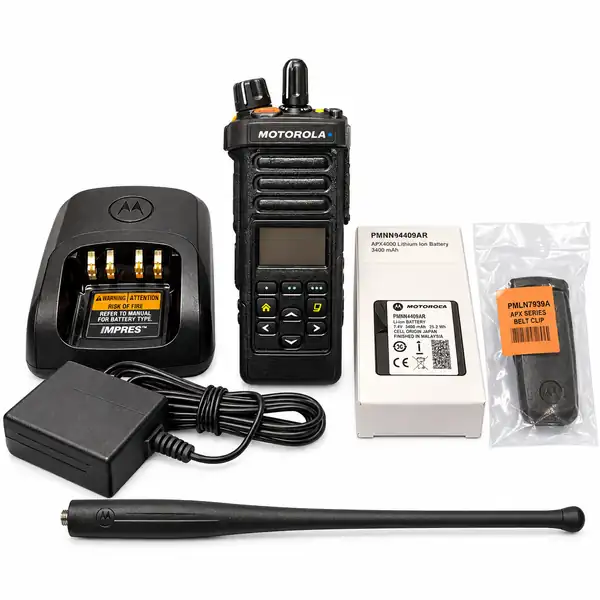
A used radio can be a sensible addition to your equipment, but a model name and a good price are only the start. Before paying, make sure the specific unit suits your work and comes with the equipment you need. Here is a checklist you can use when comparing listings or requesting a quote.
The pictured radio kit is an example. Confirm the contents of the actual listing before ordering.
Start with the equipment you already use
If you are replacing a radio or adding another to your team, send the seller the exact model number of your existing equipment. Include the frequency band and details of the system you use, if you have them. A photograph of the label is more useful than saying you need another Motorola or Kenwood.
Ask your radio technician or system administrator to confirm compatibility before purchasing. Similar-looking radios may have different configurations. Do not assume a radio will work with your team’s system simply because the brand matches.
Choose portable or mobile
Think about who will use the radio and where it will stay. If staff need to carry it as they move around, start with portable radios. If the equipment will stay in a vehicle, look at mobile radios and confirm the mounting equipment and installation requirements.
Explain your working environment when asking about coverage. Buildings, terrain and the radio system affect range. A distance quoted for one setting is not a promise that the same radio will cover your site.
Ask about the actual unit’s condition
Request clear photographs of the front, back, label, battery contacts and accessory connector. Ask about damage, missing parts, repairs and any known faults. If several radios are offered in one listing, check whether the pictures show the unit you will receive or a representative example.
A condition description should be specific. Scratches on a case are different from a damaged connector or an unreliable control. Ask what has been tested and whether any faults remain. Keep that information with your quote.
Confirm programming and enabled features
Ask whether the radio has been deprogrammed, whether any passwords or system restrictions remain, and what software, cables or assistance you will need to prepare it for use. Have your technician check the requirements for your intended system.
Treat the listing’s feature information as specific to that unit. Ask for confirmation of any feature you need rather than relying on a general description of the model family. For example, our APX4000 kit listing describes included equipment and notes that some features vary between units.
Check the battery and every included accessory
Make a written list of what comes with the purchase: battery, antenna, charger, power adapter, belt clip, microphone or mounting hardware. Ask which items are new and which are used. For a used battery, ask what is known about its condition and any testing performed.
Before adding spare accessories, confirm the exact part number and compatibility with your radio. An attractive kit price is less useful if you still need to buy essential parts separately.
Get the complete quote and terms
Confirm the quantity, availability, delivery destination, shipping charge and total price. Read the return and shipping policies and ask which warranty terms apply to the item. Save the agreed details before arranging payment.
What to send with your inquiry
Send the listing link or model number, quantity, delivery location, intended use and any existing radios you need it to work with. Tell us which accessories and features matter to you. Contact RadioMarket to confirm the specific equipment and quote before you pay.
Further reading: Motorola Solutions’ overview of two-way radios explains radio types and the factors that affect coverage.