Motorola Speaker Mics: How to Check Compatibility
· admin
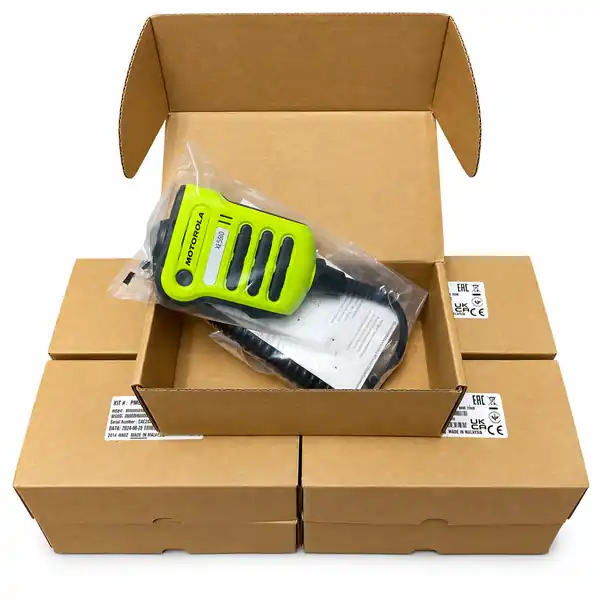
If you are replacing a Motorola shoulder mic, start with two labels: the model on the radio and the full part number on the microphone. A remote speaker microphone (RSM) puts the speaker and push-to-talk control where you can reach them while the handheld stays on your belt or in a carrier. Two mics that look alike can give you different controls, and a connector that looks right is only one part of the fit check.
Match the exact radio and mic part numbers
Write down the complete handheld model, including suffixes such as XE or e. If you are replacing a mic that already works with that radio, record its full part number, including any letters after the digits. Photograph the label and the plug. A front photo is useful for comparing controls, but it rarely settles the part-number question.
Check the mic part number against the accessory list for that exact radio. Motorola Solutions publishes separate documentation for APX accessories and MOTOTRBO XPR 7550e and XPR 7580e radios. If you have a mixed fleet, check each radio model separately before ordering a batch. The label on one working combination doesn’t identify what the other radios need.
Decide where you need to change channels
Picture where the radio will sit and which controls you need to reach without taking it out of its carrier. A mic with a channel knob can make sense when staff need to change channels from the shoulder and the combination supports that control. If staff select channels on the handheld itself, a mic without a channel knob may suit the job. If an emergency or programmable button matters, ask which controls are supported and how they are assigned on your radio.
The XE500 illustrates why the full part number matters: Motorola’s XE500 data sheet identifies the green PMMN4106 with a channel knob and the green PMMN4107 without one. RadioMarket’s safety-green PMMN4107 XE500 listing is for the version without the channel knob. Our separate XVE500 listing without a control knob asks buyers to confirm the exact part number and radio pairing. Treat those as separate listings when asking for a quote.
Check the cable, attachment and audio
Ask for photos of the plug, cable where it enters the mic, and rear clip. Check whether the cable reaches from the radio to the intended clip position without pulling when you turn or move. When reviewing a used mic, ask about worn cable jackets, damaged contacts, a loose clip or intermittent audio. Ask what has been checked on the actual unit, including transmit and receive audio and any controls you intend to use.
What to send with your inquiry
- The full handheld model and, if available, the part number of the mic it replaces.
- The mic listing or part number, plus a photo of the connector if you are unsure of the match.
- The quantity and which controls you need at the shoulder, including whether a channel knob is required.
Browse RadioMarket’s radio accessories or send RadioMarket the model and part numbers so we can check the pairing before you pay.
Leave a Reply