Buying a Used Motorola APX 7000: What to Check
· admin
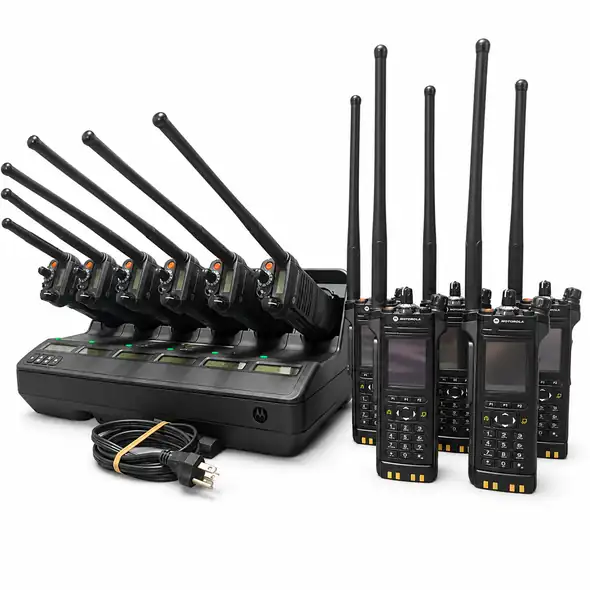
When buying a used Motorola APX 7000, start with the specific radio’s band split and supplied package. Two listings with similar model names can have different frequency coverage, activated features and accessories. A listing that suits one buyer may need a different configuration or additional items for another.
This guide uses RadioMarket’s APX 7000 and APX 7000XE listings to show what to compare. Listing details are a starting point: request confirmation of the exact unit and current availability before payment.
1. Match the band split to your actual requirements
RadioMarket lists an APX 7000 UHF1/VHF Model 3.5 and an APX 7000XE VHF/UHF2. These are different listed combinations. Do not treat UHF1 and UHF2 as interchangeable or assume that an APX 7000 covers every band.
Send the frequencies or band requirements you need checked and ask for the specific unit’s complete model and frequency-range details. Have the person responsible for your radio system confirm suitability before you choose a unit. A model name or a P25 label alone is not enough to establish compatibility with your system.
2. Verify the features on the individual radio
The UHF1/VHF APX 7000 listing describes Model 3.5 radios with a full keypad, front-panel programming (FPP), and P25 Phase 1 and Phase 2 trunking in the listed feature set. The VHF/UHF2 APX 7000XE listing describes P25 Phase 2 TDMA and FPP. Each listing directs buyers to the feature information for the unit.
Ask for current photographs of the label and feature information for the radio being offered. If a particular function matters to your use, name it in your inquiry and request confirmation rather than relying on another APX listing’s description. FPP or a full keypad should not be treated as confirmation that every required setting or system feature is available.
3. Compare the kit contents, especially the charger
The UHF1/VHF APX 7000 listing includes the radio, a UHF/VHF GPS antenna, a side cover and an IMPRES battery. It lists chargers and microphones as available separately on request. The VHF/UHF2 APX 7000XE listing includes an IMPRES battery and a new IMPRES charger.
Those package differences matter when comparing quotations. Ask for an itemized quote for the exact radio, battery, antenna, charger and microphone you want. Do not assume a charger is included because it appears with a different radio or elsewhere in a product gallery.
4. Check condition, labels and programming status
The UHF1/VHF listing describes units kept in good cosmetic condition and states that they have tags and are free from advanced system keys and passwords. The APX 7000XE listing also states that tags are present and passwords and advanced system keys have been removed. Confirm those details for the specific unit offered.
- Request clear photographs of the front, rear label, display, keypad and accessory connection area.
- Ask about the supplied battery’s condition and any available test information; an included battery is not a stated runtime guarantee.
- Confirm what functional checks have been carried out and whether any damage, missing parts or repairs need to be disclosed.
- Agree who will handle programming and system approval. Removal of a password or system key does not itself establish readiness for your intended system.
For the wider inspection process, use our used two-way radio buying checklist alongside the unit-specific information.
5. Decide whether the APX 7000 or another listing fits
If the verified dual-band configuration matches your requirements, an APX 7000 listing may be worth comparing on condition, features and the complete package. If your requirements extend beyond that configuration, review the APX 8000 quad-band listing and request its exact enabled-band and feature details.
The APX 8000 listing also discloses that its units were converted from Model 1.5 to full-keypad Model 3.5. That is a configuration detail to review with the seller, not a reason to assume all full-keypad radios share the same history. Our APX 6000 vs APX 8000 comparison covers a separate single-band versus multiband buying decision.
6. Get a written quote before arranging payment
Send RadioMarket the listing you are considering, the required bands and features, quantity, delivery destination and accessory needs. Request confirmation of the exact unit, package, condition, current availability and delivered price. Also ask for the applicable insurance, return and any remaining manufacturer-warranty terms in writing.
RadioMarket uses an inquiry-first process. Read How to Order or contact RadioMarket to discuss the radio before payment. A product listing or inquiry does not reserve a unit or confirm that it is ready for your particular system.